

Key Insights
Important takeaways when choosing a free test management tool in 2026
Expand key insights
- Most “free” tools are not fully free: Many platforms restrict reporting, integrations, or user limits, making them suitable only for small teams or short-term evaluation.
- Test management is different from test automation: Tools focused on load testing or browser automation do not replace structured test case management systems needed for QA tracking and traceability.
- Cloud tools prioritize ease of adoption: Modern SaaS platforms reduce setup effort and help teams move away from spreadsheet-based test tracking quickly.
- Open-source tools trade cost for maintenance: Self-hosted solutions remove licensing fees but require infrastructure management and technical expertise.
- Integrations matter more than features: The ability to connect with Jira, GitHub, or CI/CD pipelines often determines long-term usability more than UI or interface design.
- Free plans work best for growing teams: Startups and small QA teams benefit most, while larger organizations usually require reporting depth and scalability beyond free tiers.
- Choosing early prevents workflow migration later: Selecting a structured test management platform early avoids data loss and retraining when teams scale.
Finding reliable free test management tools in 2026 is harder than it sounds. Many platforms advertise “free,” but limit users, restrict integrations, or lock critical reporting features behind paid tiers.
For startups, small QA teams, and growing engineering teams, choosing the right free test management system can reduce costs without sacrificing visibility into test cases, test runs, defects, and reporting.
This guide evaluates the top free test management tools available in 2026, including:
- Tools with genuinely usable free plans
- Open-source test management solutions
- Platforms offering extended trials
- Free versions suitable for small QA teams
Each tool is reviewed based on:
- Test case management capabilities
- Reporting and analytics
- Integrations with bug tracking tools
- Ease of adoption
- Scalability
If your team is comparing free QA management software before committing to a paid solution, this list will help you make an informed decision.
What Is Test Management Software?
Test management software is a system used by QA teams to organize, execute, and track software testing activities in one place.
Instead of managing test cases in spreadsheets or scattered documents, teams use these tools to create structured test cases, group them into test suites, and run tests in a controlled way. Each test run records results such as pass, fail, blocked, or retest, giving teams a clear view of testing progress.
Most modern tools also connect testing with development workflows. They integrate with issue trackers like Jira, allowing teams to link failed test cases directly to bugs. This improves traceability and reduces manual work.
Test management tools are not the same as automation tools. They do not execute automated tests themselves but help manage both manual and automated testing in a structured way.
At its core, test management software helps teams answer simple but critical questions:
- What has been tested?
- What failed?
- What is still pending?
- Are we ready to release?
Why Teams Use Test Management Tools
Teams adopt test management tools when testing starts becoming difficult to track and scale.
In small projects, spreadsheets may work. But as the number of test cases grows and multiple testers are involved, it becomes hard to maintain consistency, visibility, and accountability.
Test management tools solve this by bringing structure to the testing process.
They help teams:
- Organize Test Cases Clearly: Instead of scattered files, all test cases are stored in one system with proper structure, versioning, and reuse.
- Track Execution in Real Time: Teams can see which tests passed, failed, or are still in progress without manual updates.
- Improve Collaboration: Testers, developers, and managers can work in the same system, reducing miscommunication.
- Link Testing With Development: Integrations with tools like Jira make it easy to track defects alongside test results.
- Increase Release Confidence: With clear reporting and coverage visibility, teams can decide whether a release is ready or not.
Most importantly, these tools reduce guesswork. Instead of relying on assumptions, teams get a clear and measurable view of testing progress.
How We Evaluated the Tools
This list focuses on tools that are genuinely useful for QA teams looking for free or low-cost test management solutions in 2026.
Each tool was evaluated based on practical usage rather than just feature lists.
1. Test Case Management Capabilities
We looked at how well each tool supports creating, organizing, and maintaining test cases. Tools that provide structured workflows and reusable test assets were prioritized.
2. Test Execution & Tracking
The ability to run tests, assign testers, and track results in real time was a key factor. Tools that provide clear execution visibility ranked higher.
3. Reporting & Insights
Good reporting helps teams understand progress and release readiness. We evaluated dashboards, execution summaries, and overall visibility.
4. Integrations
We checked how well each tool integrates with development and issue tracking systems like Jira. Strong integrations reduce manual work and improve workflow efficiency.
5. Ease of Adoption
Tools should be easy to set up and use without heavy training. Clean interfaces and simple workflows were preferred, especially for small teams.
6. Free Plan or Trial Value
Not all “free” tools are actually usable. We evaluated whether the free plan or trial provides enough functionality for real-world testing.
7. Scalability
We considered whether the tool can grow with the team, or if it becomes limiting as testing needs increase.
The goal was simple: identify tools that QA teams can realistically use, not just tools that look good on paper.
List of Free Test Management Tools 2026
1. Tuskr – Best Affordable Cloud-Based Test Management Tool
Tuskr is a modern, cloud-based test management platform built for QA teams that need structured, reliable test case management without the complexity and cost often associated with enterprise test management systems. It delivers a focused, practical environment for organizing test cases, executing test runs, tracking defects, and generating reports, all within a clean and intuitive interface.
In 2026, many teams searching for “free test management tools” are not looking for performance testing platforms or automation-only utilities. They need a centralized system to manage manual testing workflows while staying compatible with automated pipelines. Tuskr addresses this gap by offering a dedicated test management system designed specifically for QA operations while providing many of the structured capabilities teams typically expect from enterprise test management solutions.
Unlike tools that prioritize load testing or browser automation, Tuskr focuses on the core pillars of test management:
- Structured test case organization
- Test run planning and execution
- Test cycle tracking
- Defect integration
- Real-time reporting and progress visibility
This clear specialization makes Tuskr a true test management solution rather than a testing add-on.
Tuskr is especially appealing to startups, Agile teams, and mid-sized organizations transitioning from spreadsheets or disconnected tools. It provides enough structure to improve testing discipline while remaining simple enough for rapid onboarding. Teams can adopt it quickly without extensive training or technical configuration.
From a cost perspective, Tuskr positions itself as an affordable alternative to enterprise platforms. It offers a 30-day free trial, allowing teams to evaluate core functionality before committing. This makes it particularly attractive for organizations searching for low-cost or scalable test management software in 2026.
For teams that want clarity, structured workflows, and actionable test reporting, without paying enterprise-level pricing, Tuskr earns its place at the top of this list.

Key Features
- Structured Test Case Management: Create, organize, and maintain detailed test cases with folders, custom fields, tags, and version history. Tuskr allows QA teams to build reusable, well-documented test libraries that scale across projects without losing structure or traceability.
- Test Runs, Cycles & Execution Control: Plan test cycles, assign testers, and execute test runs with real-time status tracking. Monitor pass, fail, blocked, and retest results instantly, giving managers clear visibility into sprint-level execution progress.
- Defect Tracking & Issue Integration: Seamlessly integrate with issue tracking systems like Jira to log and link defects directly to failed test cases. This ensures traceability between test execution and bug resolution without switching tools.
- Burndown & Progress Reporting: Visual burndown charts and execution dashboards help teams track test completion rates, sprint performance, and release readiness at a glance. Managers can quickly identify bottlenecks and underperforming areas.
- Planned vs. Actual Execution Analysis: Compare estimated execution time against actual test completion time. This helps improve sprint forecasting accuracy and provides insights into team productivity trends over time.
- Reusable Test Suites & Templates: Save time by reusing test cases and suites across multiple projects. This reduces duplication, enforces standardization, and accelerates regression testing cycles.
- Rich Text Editor (WYSIWYG): Document clear test steps, preconditions, and expected results using an intuitive editor with formatting options. This ensures better readability and reduces ambiguity during execution.
- Role-Based Access & Collaboration: Control access with role-based permissions and enable collaborative test planning across distributed teams. Stakeholders can monitor progress without interfering in execution workflows.
Why Tuskr Ranks #1 in 2026
Tuskr ranks #1 among free and affordable test management tools in 2026 because it delivers structured, purpose-built test management without unnecessary complexity or enterprise overhead.
Many tools in this list focus on performance testing, automation execution, or DevOps pipelines. Tuskr focuses specifically on what QA teams need most: organizing test cases, executing test cycles, tracking defects, and generating actionable reports in one clean interface.
It bridges the gap between spreadsheets and expensive enterprise platforms. For startups, agile teams, and growing QA departments, Tuskr provides the right balance of usability, reporting depth, and affordability, making it one of the most practical test management solutions available today.
Pros
- Clean, modern interface with minimal learning curve
- Structured test case and test cycle management
- Real-time execution tracking and burndown reporting
- Strong integrations with issue tracking tools (e.g., Jira)
- Affordable pricing compared to enterprise alternatives
- Cloud-based access with quick setup
Cons
- No permanent free tier (trial only)
- Limited built-in automation orchestration
- Not open-source (self-hosting not available)
Free Plan / Trial Details
Tuskr offers a 30-day free trial that gives full access to its core test management capabilities, including test case management, test runs, reporting, and integrations. This allows QA teams to evaluate real workflows before making a purchase decision.
Tuskr does not provide a permanent free plan. Instead, it positions itself as a cost-effective alternative to enterprise test management tools that often require significantly higher annual commitments.
For teams currently using spreadsheets or basic tracking tools, the trial provides a practical way to assess structured test management without long-term risk.
Best Suited For
- Startups
- Small QA teams
- Agile teams needing structured test case management
- Organizations transitioning from spreadsheets
Understand Your QA Workflow First
Learn how structured test management improves release confidence and team visibility.
2. BrowserStack Test Management – Best for Unified Manual & Automated Test Tracking
BrowserStack Test Management is a centralized platform that unifies manual and automated
testing. It bridges the gap for teams struggling with fragmented workflows, replacing
spreadsheets and scattered CI/CD logs with a single source of truth to track release readiness.
In 2026, many teams searching for test management tools prioritize seamless integrations over
complex standalone setups. BrowserStack Test Management stands out with its real-time, two-
way Jira integration, allowing engineering teams to monitor test coverage and bug statuses
without constantly switching tabs. It also offers one-click migration from legacy tools like
TestRail, Zephyr, and Xray, significantly reducing the friction of adopting a new platform.
Furthermore, its native integration with the broader BrowserStack ecosystem links test runs
directly to a cloud of 30,000+ real devices and browsers. This provides end-to-end traceability,
mapping requirements to test cases and defects effortlessly.

Key Features
- Unified Testing Dashboard: Consolidates results from manual testing and automated CI/CD pipelines into one centralized view, giving teams a single source of truth for release readiness.
- Two-Way Jira Integration: Links test cases and runs directly to Jira tickets, ensuring real-time visibility into test coverage and bug statuses without leaving the Jira interface.
- One-Click Migration: Easily imports existing test cases and projects from legacy tools like TestRail, Zephyr, and Xray, or via CSV, eliminating painful setup processes.
- Rich Dashboards and Reporting: Provides out-of-the-box metrics on test execution progress, pass/fail rates, and coverage, replacing manual spreadsheets.
- CI/CD & Automation Integrations: Connects seamlessly with TestNG, JUnit, Cypress, Playwright, and major CI/CD tools to automatically report test results.
- End-to-End Traceability: Maps requirements to test cases to defects, ensuring full coverage validation and effortless compliance audits.
- Native Ecosystem Integration: Connects directly with BrowserStack Automate, App Automate, and Live, linking test management to real-device execution environments.
Pros
- Consolidates manual and automated test results in one place
- Deep, real-time two-way synchronization with Jira
- Fast, painless migration from legacy test management tools
- Native APIs and SDKs for developer-friendly automation
- Direct connection to BrowserStack’s real device testing cloud
Cons
- Advanced legacy tool migration and Jira sync require paid tiers
- Full ecosystem benefits require subscriptions to other BrowserStack products
Free Plan / Trial Details
BrowserStack offers a permanent free tier for core test case management, manual execution, and basic reporting.
Advanced features like two-way Jira integration and automated framework APIs require a custom-priced Pro or Enterprise plan.
Best Suited For
- QA teams managing both manual and automated suites
- Agile teams heavily reliant on Jira for issue tracking
- Organizations migrating away from legacy tools like TestRail or Zephyr
- Engineering teams wanting traceability linked directly to real-device cloud testing
3. Qase – Best Modern Test Management System for Growing QA Teams
Qase is a cloud-based test management platform built for modern QA and development teams. It supports both manual and automated testing workflows, offering structured test case organization, execution tracking, and detailed reporting in a clean, intuitive interface.
Designed to scale with growing teams, Qase positions itself as a centralized hub for managing test cases, test runs, and defect tracking. It integrates with popular issue trackers and CI/CD pipelines, making it suitable for Agile and DevOps environments.
For teams searching for free test management tools in 2026, Qase offers a free plan with core features, making it accessible for startups and small QA teams while still providing upgrade paths for advanced needs.
Unlike spreadsheet-based workflows, Qase provides a structured system that improves visibility, accountability, and collaboration across QA cycles.

Key Features
- Test Case Management: Organize test cases into suites with custom fields, tags, and version history.
- Test Runs & Plans: Create structured test plans, assign test runs, and monitor execution progress in real time.
- Manual & Automated Testing Support: Manage manual test cases while integrating automated test results via API and CI tools.
- Defect Integration: Seamless integration with Jira, GitHub, GitLab, and other issue tracking systems.
- Customizable Reports & Analytics: Generate execution reports, run summaries, and testing metrics for stakeholders.
- Role-Based Access Control: Define permissions for testers, developers, and managers.
Pros
- Modern and intuitive interface
- Free plan available
- Strong integrations with development tools
- Suitable for Agile and DevOps teams
- Scalable for growing organizations
Cons
- Advanced reporting features require paid plans
- Limited on-premise deployment options
- Customization depth is lower than enterprise-level tools
Free Plan / Trial Details
Qase offers a free tier for small teams with core test management features.
Paid plans unlock advanced reporting, additional integrations, and expanded project capabilities.
Best Suited For
- Startups and small QA teams
- Agile development environments
- DevOps teams integrating automated testing
- Organizations replacing spreadsheets with structured test management
4. Parasoft – Best Enterprise-Grade AI-Powered Testing Platform
Parasoft is an enterprise-focused testing and quality engineering platform designed to help teams improve software reliability, automate testing workflows, and accelerate release cycles across complex development environments.
Unlike lightweight testing utilities, Parasoft combines automated testing, API validation, service virtualization, static code analysis, and compliance-focused quality engineering within a unified ecosystem. This makes it especially useful for organizations managing large-scale applications, regulated software, or distributed DevOps pipelines.
For teams evaluating advanced test management and continuous testing platforms in 2026, Parasoft offers strong enterprise-grade capabilities with deep CI/CD integration, AI-assisted testing workflows, and centralized reporting.
Parasoft is particularly well-suited for enterprises that require scalable automation, compliance traceability, and continuous quality validation across modern software delivery lifecycles.

Key Features
- Automated Testing & Validation: Supports functional, regression, API, UI, and integration testing across enterprise applications.
- AI-Assisted Test Optimization: Uses AI-driven analysis to improve coverage, reduce redundant testing, and identify high-risk areas.
- Service Virtualization & API Testing: Simulate dependent systems and validate APIs within distributed environments.
- Static Code Analysis & Compliance Support: Detect security, reliability, and coding standard issues with compliance-focused validation.
- CI/CD & DevOps Integration: Integrates with Jenkins, Jira, GitLab, Azure DevOps, and modern delivery pipelines.
- Centralized Reporting & Traceability: Provides dashboards, analytics, and linked visibility across testing, defects, and code quality.
Pros
- Strong enterprise automation capabilities
- Deep CI/CD and DevOps integrations
- AI-assisted testing and analytics
- Excellent compliance and traceability support
- Scalable for distributed engineering teams
Cons
- More complex than lightweight QA tools
- Requires onboarding for advanced workflows
- Premium enterprise-focused pricing
Free Plan / Trial Details
Parasoft offers demos and evaluation access for organizations exploring automated testing, API testing, and enterprise quality engineering workflows.
Best Suited For
- Enterprise QA teams
- Regulated industries and compliance-heavy environments
- Large DevOps organizations
- API and distributed system testing
- Teams adopting continuous testing at scale
5. TestLodge – Best streamlined Test Case Management Tool
TestLodge is a frictionless test case management tool that helps QA teams organize and execute test cases, with a keen eye on simplicity and usability. It provides a centralized place to manage test plans, requirements, test cases, and test runs.
Unlike more feature-heavy enterprise tools, TestLodge offers a clean, lightweight approach to testing so teams can get up and running quickly. It supports guided test execution and requirement traceability, with quick, easy access to test progress via reporting and dashboards. With unlimited users and no per-user pricing, it is especially well-suited for teams looking for a cost-effective solution.
TestLodge integrates with the most popular issue-tracking tools, such as Jira, Trello, and Linear, enabling seamless defect management throughout the testing process. These integrations allow teams to raise bugs directly from within test runs whenever a test fails.
Other integration features include syncing the defect ticket status back into TestLodge, adding comments when verifying fixes, and resolving raised issues, all from inside TestLodge. This helps QA and development teams stay in sync without switching between tools.

Key Features
- Test case management: Create and organize test cases with an easy-to-manage system.
- Test execution: Run tests with guided workflows.
- Requirement linking: Associate requirements to test cases and view traceability reports.
- Reporting: View results and progress through reports and dashboards.
- Issue tracker integrations: Automate defect raising when a test fails.
- User roles and permissions: Customizable user roles and permissions.
- Team collaboration: Enable teams to collaboratively work together on shared test runs.
- Unlimited user pricing: Add users without additional per-seat costs.
Pros
- Lightweight, easy-to-use interface
- No per-user pricing (cost-effective for growing teams)
- Strong integrations with popular issue trackers
- Quick setup and low learning curve
- Suitable for teams and companies of all sizes
Cons
- Limited advanced customization compared to dedicated enterprise tools
- No permanent free level (trial-based access only)
Free Plan / Trial Details
TestLodge offers a free trial for all accounts
No per-user cost, pay per account.
Best Suited For
- Teams of all sizes seeking an affordable solution that will scale well
- Organisations that already have an issue tracker set up
- QA teams looking for a lightweight solution
6. TestCollab – Best Collaborative Test Management for Agile Teams
TestCollab is a cloud-based test management platform designed to help QA teams collaborate more effectively while maintaining structured test execution processes. It supports manual and automated testing workflows, offering centralized visibility into test cases, execution progress, and team workloads.
Unlike basic test tracking tools, TestCollab focuses heavily on team collaboration and execution transparency. It enables QA managers to assign work intelligently, monitor capacity, and reduce repetitive effort through reusable test assets.
For teams evaluating free test management tools in 2026, TestCollab offers a free trial and structured pricing tiers, making it suitable for small teams while still supporting scale as testing complexity increases.
TestCollab is positioned as a structured alternative to spreadsheet-based QA tracking, especially for Agile environments running frequent test cycles.

Key Features
- Centralized Test Case Management: Create, organize, and reuse test cases across multiple projects with structured suites and tagging.
- Test Plans & Execution Tracking: Assign test runs to team members and monitor execution status in real time.
- Reusable Test Suites: Reuse common test cases across projects to reduce duplication and save setup time.
- Workload & Capacity Insights: View team availability and track who is at capacity to balance QA assignments effectively.
- Defect Tracking Integration: Integrates with Jira and other issue tracking systems to link defects directly to test cases.
- Time Tracking & Execution Metrics: Track estimated vs. actual test execution time to improve planning accuracy.
Pros
- Strong collaboration capabilities
- Reusable test suite functionality
- Clear execution visibility
- Integrates with popular bug trackers
- Suitable for Agile teams
Cons
- Advanced analytics limited in lower-tier plans
- UI may feel dense for new users
- No permanent free plan (trial-based access)
Must Check: The Better Alternative to Test Collab
Free Plan / Trial Details
TestCollab offers a free trial for teams evaluating the platform.
It does not provide a permanent free tier, but paid plans scale based on team size and feature access.
Best Suited For
- Agile QA teams
- Mid-sized development teams
- Organizations needing reusable test structures
- Teams moving from spreadsheets to structured test management
Track Test Execution Clearly
Understand how execution tracking helps teams detect failures earlier in the release cycle.
7. QADeputy – Best for Reporting-Focused Test Management
QADeputy is a cloud-based test management solution built to centralize and streamline QA operations. It helps teams manage test cases, test runs, and defect tracking while providing strong reporting capabilities for managers and stakeholders.
Unlike lightweight test trackers, QADeputy emphasizes execution visibility and historical reporting. It allows QA leads to monitor trends across test cycles, analyze execution history, and identify unstable or flaky tests that require attention.
For teams searching for free test management tools in 2026, QADeputy offers a free trial model rather than a permanent free tier. It is positioned as a structured alternative for teams that need deeper reporting and centralized control without moving to high-cost enterprise platforms.
QADeputy is particularly useful when stakeholders require consistent reporting and audit visibility across multiple test cycles.

Key Features
- Centralized Test Case Management: Store and organize test cases, suites, and test runs within a unified dashboard.
- Historical Test Run Reporting: Track execution history over time to identify patterns, regressions, and recurring failures.
- Flaky Test Detection: Identify unstable test cases that frequently fail across builds.
- Customizable Fields & Workflows: Configure statuses, fields, tags, and reusable snippets to match QA processes.
- Real-Time Reporting: Generate execution dashboards and reports to share progress with stakeholders.
- Issue Tracker Integration: Connect with tools like Jira to link defects with related test cases.
Pros
- Strong historical reporting capabilities
- Centralized QA visibility
- Customizable fields and workflows
- Good integration with bug tracking systems
- Cloud-based access
Cons
- No permanent free plan
- Interface may require onboarding for new teams
- Limited advanced automation orchestration
Free Plan / Trial Details
QADeputy offers a free trial for evaluation.
It does not provide a long-term free tier, and full functionality requires a paid subscription.
Best Suited For
- QA teams that require detailed reporting
- Organizations needing historical execution tracking
- Mid-sized teams managing recurring test cycles
- Teams seeking structured oversight without enterprise pricing
8. TestLink – Best Open-Source Test Management System
TestLink is a widely used open-source test management tool designed to help QA teams manage test cases, test plans, and execution tracking in a structured environment. It is particularly popular among organizations that prefer self-hosted software and full control over their testing data.
Unlike cloud-based SaaS platforms, TestLink requires internal hosting and maintenance. This makes it suitable for companies with technical resources that want a cost-free test management solution without recurring licensing fees.
TestLink focuses purely on test management rather than automation or performance testing, making it a true test case management system within the QA lifecycle.
Key Features
- Test Case Management: Create and organize test cases in hierarchical test suites with version control support.
- Test Plans & Builds: Group test cases into structured plans and track execution across different builds and releases.
- Requirements Traceability: Link test cases to project requirements to measure test coverage and validation.
- Execution Tracking: Record pass/fail status, assign testers, and monitor progress through test cycles.
- Role-Based Access Control: Define user roles and permissions to manage access across QA teams.
- Integration Support: Integrates with popular defect tracking tools such as Jira, Bugzilla, and Mantis.
Pros
- Completely free and open-source
- No licensing costs
- Full data control through self-hosting
- Strong requirement traceability
- Customizable workflows
Cons
- Requires internal hosting and maintenance
- Interface feels dated compared to modern SaaS tools
- Limited built-in automation orchestration
- Setup and configuration require technical expertise
Free Plan / Pricing Details
TestLink is fully open-source and free to use.
There are no licensing fees. However, organizations must manage their own hosting, infrastructure, and maintenance.
Best Suited For
- Organizations requiring on-premise deployment
- Budget-conscious QA teams
- Companies needing full data ownership
- Technical teams are comfortable managing open-source systems
9. BugBug – Best for No-Code Automated Browser Testing
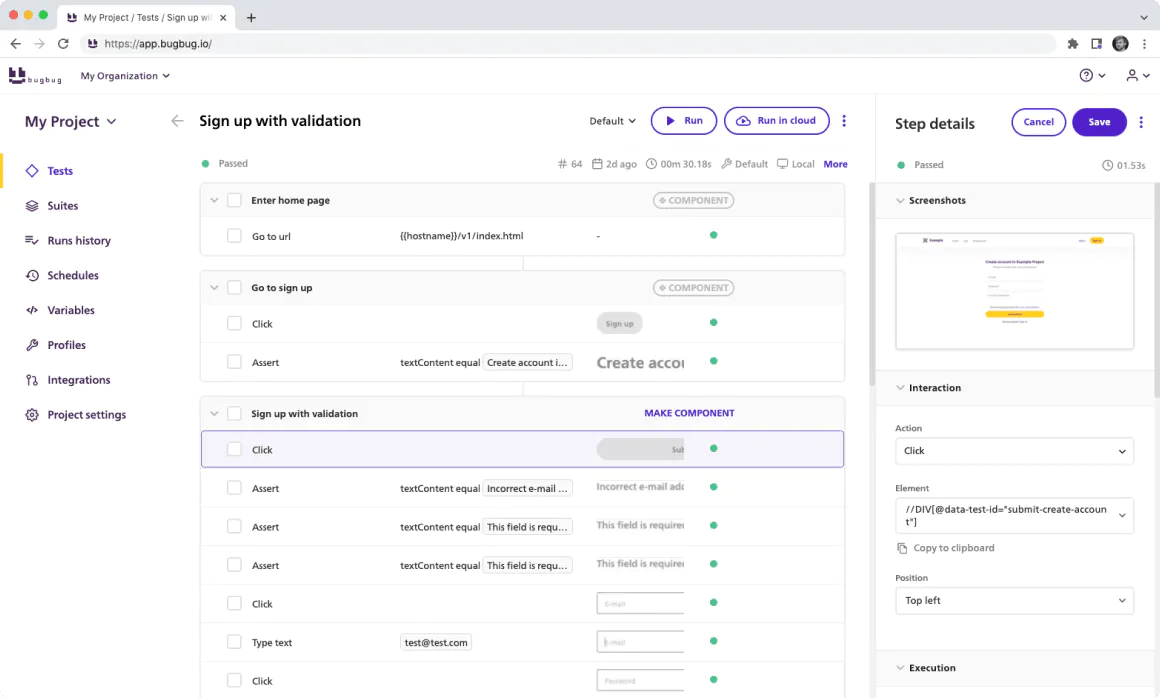
BugBug is a cloud-based automated browser testing tool designed for teams that want to create and run UI tests without heavy scripting. Unlike traditional test management platforms, BugBug focuses on browser-based automation and test execution rather than structured test case lifecycle management.
For teams researching free test management tools in 2026, BugBug fits best when the primary need is automated web testing with minimal setup. It allows users to record, edit, and execute browser tests directly from a simple interface without requiring deep programming knowledge.
BugBug supports modern web applications and enables teams to validate user flows, regression paths, and UI behavior across builds. However, it is not a full test case management system like Tuskr or Qase. It works better as a test automation layer rather than a centralized QA management platform.
Key Features
- No-Code Test Recorder: Record browser interactions and convert them into automated test scripts.
- Cloud Test Execution: Run multiple tests in parallel in the cloud without managing infrastructure.
- Cross-Domain Testing: Support for complex scenarios across multiple domains or browser tabs.
- Scheduled Test Runs: Automate regular regression testing with scheduled executions.
- Parallel Execution: Speed up testing cycles by running multiple tests simultaneously.
- CI/CD Integration: Integrate with pipelines to support automated regression testing workflows.
Pros
- No-code automation approach
- Quick setup and easy onboarding
- Cloud-based execution
- Parallel testing support
- Suitable for regression testing
Cons
- Not a full-featured test management system
- Limited structured test case management
- Focused primarily on browser automation
Free Plan / Trial Details
BugBug offers a free trial with limited usage.
Ongoing access requires a paid subscription based on usage and features.
Best Suited For
- Startups validating web applications
- Teams needing browser automation without coding
- QA teams adding lightweight regression automation
- Organizations supplementing an existing test management tool
Understand Test Coverage & Defects
See how linking defects with test cases improves release readiness and quality control.
10. TestRail – Best Enterprise-Grade Test Case Management Platform
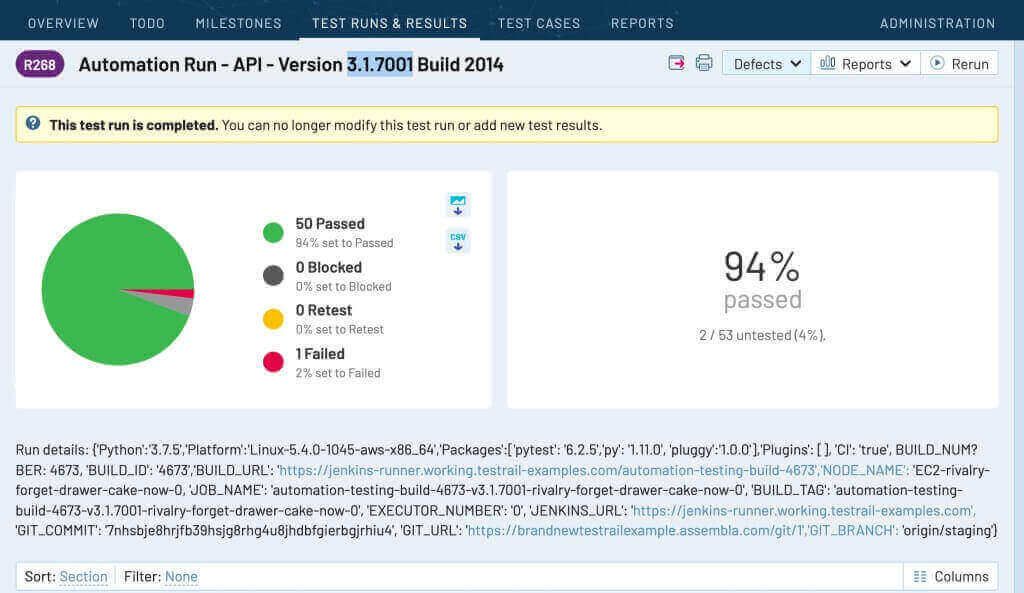
TestRail is a mature and widely adopted test case management platform designed for QA teams that require structured test planning, execution tracking, and detailed reporting at scale. It is used by mid-sized to large organizations that need visibility across multiple test cycles, builds, and releases.
Unlike open-source tools, TestRail is a commercial product offering both cloud-hosted and self-managed deployment options. It supports manual testing workflows while integrating with automation frameworks and CI/CD pipelines.
TestRail is focused specifically on test management rather than performance testing or automation execution, making it a centralized system of record for QA teams.
Key Features
- Test Case Management: Organize test cases into reusable test suites with versioning and customizable fields.
- Test Plans & Milestones: Create structured test plans, track releases, and monitor progress against defined milestones.
- Execution Tracking: Run test cycles, assign testers, and record results with real-time status visibility.
- Traceability & Coverage: Map test cases to requirements and defects to ensure full validation coverage.
- Advanced Reporting: Generate dashboards, summary reports, and detailed execution analytics for stakeholders.
- CI/CD & Automation Integration: Integrates with Jira, Azure DevOps, GitHub, Jenkins, Selenium, and other automation tools.
Pros
- Enterprise-ready scalability
- Strong reporting and analytics
- Flexible deployment (cloud and self-managed)
- Wide integration ecosystem
- Structured release and milestone tracking
Cons
- No permanent free plan
- Higher cost compared to lightweight tools
- Interface may feel complex for small teams
- Advanced features require onboarding
Free Plan / Pricing Details
TestRail does not offer a permanent free tier.
It provides a limited free trial for evaluation. Paid plans vary depending on cloud or self-managed deployment and the number of users.
Best Suited For
- Mid-sized to enterprise QA teams
- Organizations managing multiple releases
- Teams requiring detailed traceability and compliance reporting
- Companies integrating automated testing into CI/CD pipelines
11. BlazeMeter – Best for Performance & Continuous Testing
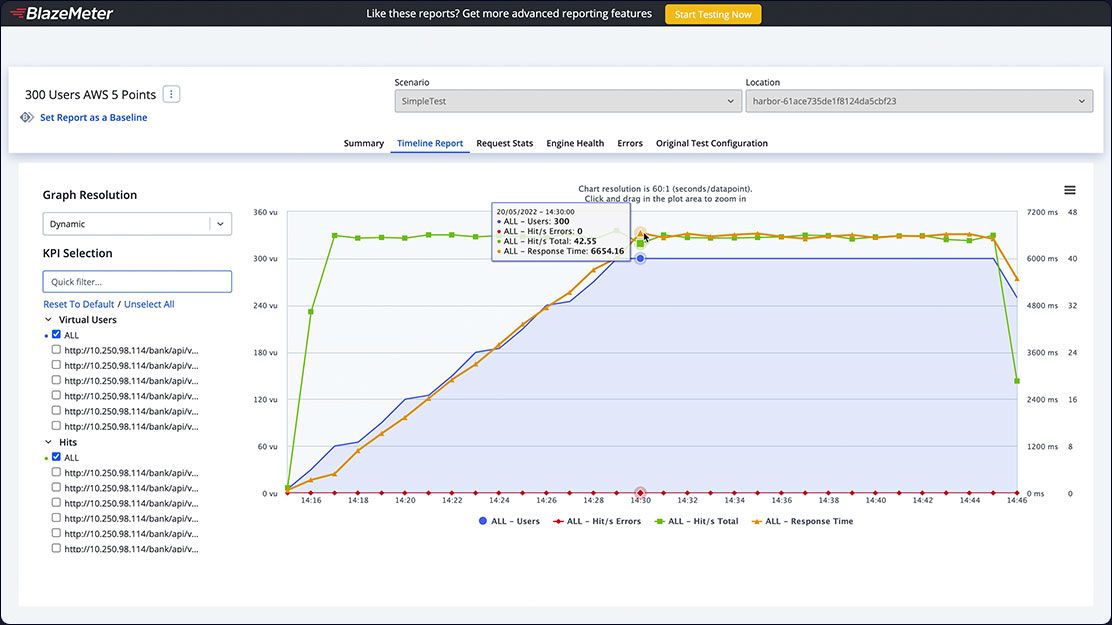
BlazeMeter is a continuous testing platform focused primarily on performance testing, load testing, and API testing. It supports tools like JMeter, Selenium, and Gatling, allowing teams to run large-scale performance tests across cloud environments.
For teams searching for free test management tools in 2026, BlazeMeter is not a traditional test case management system. Instead, it is a performance testing and continuous testing platform designed for DevOps and engineering teams that need to validate system stability under load.
BlazeMeter helps organizations simulate real-world traffic, detect bottlenecks, and compare performance metrics across builds. It is often used in CI/CD pipelines to ensure application reliability before production releases.
Key Features
- Performance & Load Testing: Run large-scale load tests using JMeter and other open-source frameworks.
- API Testing: Validate API performance and reliability across different environments.
- Selenium Integration: Execute automated functional tests within broader performance workflows.
- Cloud-Based Test Execution: Scale tests across distributed cloud environments without maintaining infrastructure.
- Advanced Reporting & Comparison: Interactive dashboards with trend analysis and performance comparisons across builds.
- CI/CD Integration: Integrate with DevOps pipelines for continuous testing workflows.
Pros
- Strong performance and load testing capabilities
- Supports open-source testing frameworks
- Scalable cloud infrastructure
- Advanced analytics and reporting
- CI/CD ready
Cons
- Not a structured test case management system
- Can be complex for small QA teams
- Free tier has limited usage
Free Plan / Trial Details
BlazeMeter offers a limited free tier for small-scale testing.
Advanced performance and enterprise features require paid plans.
Best Suited For
- DevOps teams running performance testing
- Engineering teams validating system scalability
- Organizations practicing continuous testing
- Teams already using JMeter or Selenium
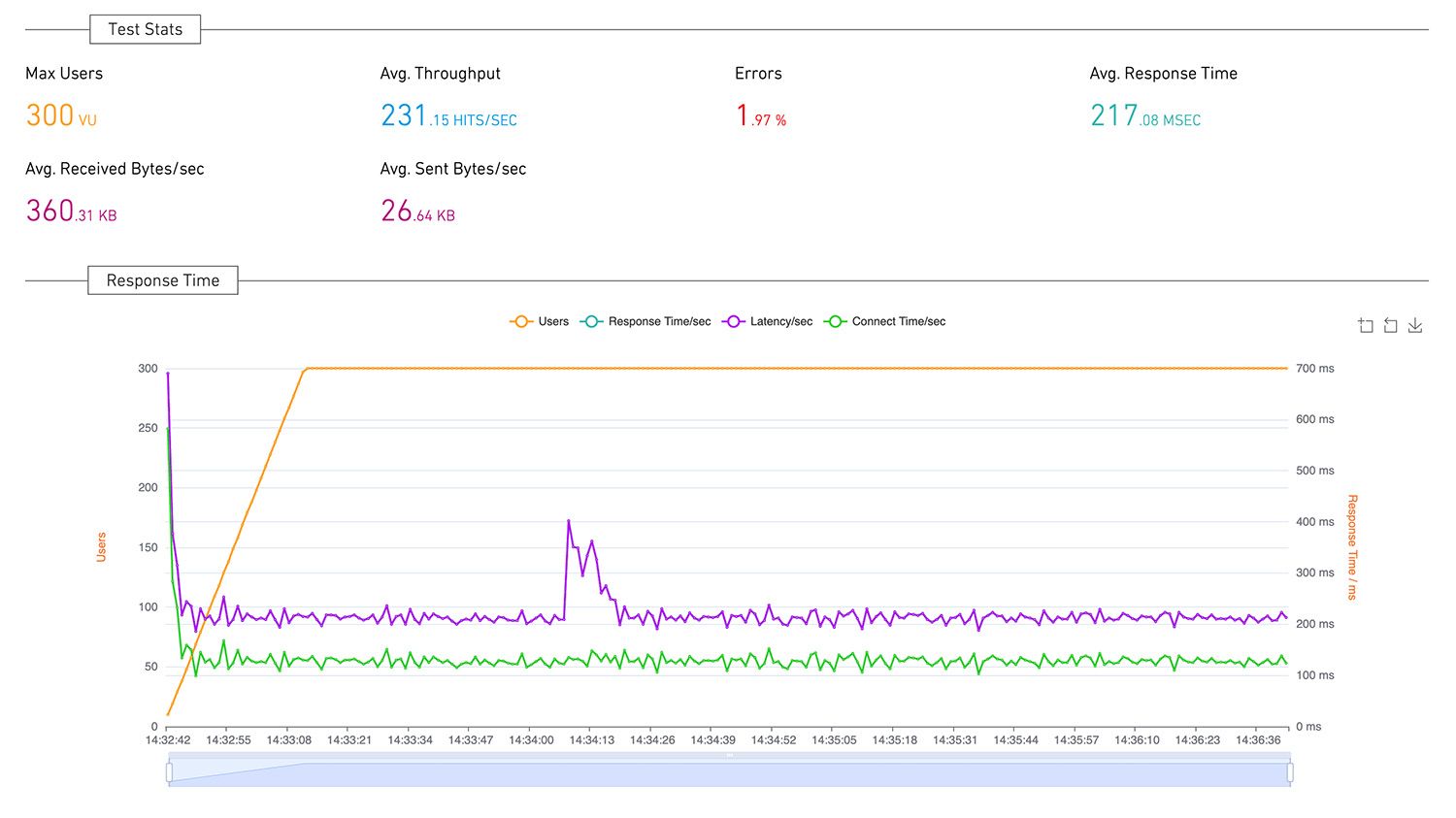
12. Loadium – Best for Cloud-Based Performance & Load Testing Platform
Loadium is a cloud-based performance testing platform designed to help teams validate application scalability, reliability, and speed under real-world load conditions. While not a traditional test case management tool, Loadium supports performance testing workflows and is often evaluated by QA teams looking for free or trial-based load testing solutions.
Loadium supports both cloud and on-premise deployments, allowing teams to simulate traffic, identify bottlenecks, and compare performance across builds. It integrates with popular open-source testing frameworks, making it suitable for teams already using Selenium, JMeter, or Gatling.
Unlike test case management tools such as Tuskr or TestRail, Loadium focuses specifically on performance and load validation, helping teams detect infrastructure or application slowdowns before production release.
Key Features
- Cloud & On-Premise Load Testing: Run scalable load tests in the cloud or deploy within internal infrastructure.
- Script Upload Support: Upload and execute existing Selenium, Gatling, or JMeter scripts without rebuilding tests.
- Performance Comparison Reports: Compare system performance across builds to identify regressions after code changes.
- Real-Time Monitoring Dashboard: Track system metrics, response times, and failure rates during test execution.
- Bottleneck Detection: Identify performance constraints at the application, database, or server levels.
- CI/CD Integration: Integrate load testing into DevOps pipelines to automate performance validation.
Pros
- Supports popular open-source scripting frameworks
- Cloud scalability without managing infrastructure
- Useful performance comparison reporting
- Suitable for DevOps and CI/CD environments
Cons
- Not a test case management platform
- Focused primarily on performance testing
- May require technical expertise for advanced scripting
- Free access may have execution limits
Free Plan / Trial Details
Loadium offers a limited free tier or trial access (depending on plan availability), allowing teams to evaluate performance testing capabilities before upgrading to paid plans.
Usage limits may apply to concurrent users, test duration, or virtual users.
Best Suited For
- QA teams performing load and performance testing
- DevOps teams integrating testing into CI/CD pipelines
- Engineering teams validating system scalability
- Organizations preparing for high-traffic releases
You Must Check These:
Comparison Chart: Free Test Management Tools (2026)
| Tool | Type | Free Plan | Best For | Key Strength |
|---|---|---|---|---|
|
| Cloud Test Management | Free Trial/Tier | Startups & Agile QA teams | Structured workflows |
| BrowserStack | Cloud Test Management | Free Tier | Agile QA teams | Unified tracking & Jira sync |
| Qase | Cloud Test Management | Free Tier | Growing DevOps teams | Modern integrations |
|
| Collaborative QA | Trial | Agile teams | Workload visibility |
|
| Enterprise QA | Trial | Large teams | Traceability |
|
| Open Source | Free | Self-hosted teams | Full control |
How to Choose the Right Tool
The right free test management tool depends on how your team tests, collaborates, and releases software. Use the guide below to quickly identify which category fits your workflow.
Step 1: Identify Your Testing Type
Manual Testing Teams
Need structured test cases, execution tracking, and reporting visibility.
Automation Teams
Need CI/CD integration and automated result tracking.
Performance Testing Teams
Need load and API testing platforms rather than test case managers.
Important: Automation tools cannot replace structured test management systems.
Step 2: Match Your Team Size
- 1–5 testers: Most free plans work reliably
- 5–20 testers: Integrations and permissions become critical
- 20+ testers: Reporting and scalability matter more than cost
Choosing a scalable system early prevents migration later.
Step 3: Check Integrations
Your testing workflow should connect directly with development tools:
- Issue tracking tools (Jira, etc.)
- Git repositories
- CI/CD pipelines
- Automation frameworks
Without integrations, teams duplicate work across systems.
Step 4: Reporting & Visibility
A good test management system should clearly answer:
- Are we ready to release?
- Which areas failed?
- What is our coverage?
- Where are the bottlenecks?
Step 5: Cloud vs Open-Source
Cloud Tools
- Fast setup
- Easy adoption
- Automatic updates
Open-Source Tools
- No licensing cost
- Full data control
- Requires maintenance
Pro tip: Teams usually switch tools due to lack of visibility, not lack of features. If stakeholders cannot clearly understand release readiness, the tool will eventually be replaced.
Conclusion
Choosing a free test management tool is less about picking the most feature-rich platform and more about selecting the one that matches how your team tests, tracks, and releases software.
For small QA teams:
Free tiers and simple cloud tools are usually enough to organize test cases and maintain visibility without adding complexity.
For growing teams:
Integration support, reporting clarity, and traceability become more important than cost savings.
For advanced workflows:
Teams benefit from platforms that clearly show coverage, release readiness, and defect impact across cycles.
The most effective tool is the one that helps your team understand testing progress quickly and make confident release decisions — not just the one with the longest feature list.
Common questions teams ask before choosing a free test management tool



Comments
0 responses