


A Gantt chart can look perfectly reasonable on the day you build it. The bars line up, the dependencies connect cleanly, and the end date lands exactly where the sponsor wanted it. Then you check who is actually assigned to each task, and the plan quietly falls apart. The same backend developer is booked on three overlapping workstreams. The one QA engineer who understands the legacy system is expected to test two releases in the same week. The schedule was never wrong on paper. It was wrong the moment someone compared it to real capacity.
That comparison, and the adjustment that follows it, is what resource leveling in a Gantt chart is for. It is not a cosmetic feature or a reporting nicety. It is the step that turns a schedule that looks achievable into one that actually is, by checking dates against the people and skills available to do the work.
This guide covers what resource leveling really means, how it differs from resource allocation and capacity planning, the exact steps to run it on a live project, the mistakes that quietly undo it, and what to check when you evaluate software that claims to handle it, whether you run this weekly as a project manager, standardize it across a portfolio as a PMO, or want to know why engineering capacity never seems to match the roadmap.
What resource leveling actually means (and how it differs from resource allocation)
Resource allocation is the act of assigning a specific person, role, or asset to a task. It answers one question: who is doing this. Resource leveling is what happens after that allocation reveals a conflict. It adjusts the schedule itself, meaning start dates, durations, or the order of tasks, so the allocation is actually achievable. It answers a different question: when can this realistically happen, given who is doing it and what else they are already committed to.
The two get treated as the same thing constantly, which is exactly why so many project plans stay broken longer than they should. Allocation without leveling produces a Gantt chart that assigns work correctly but schedules it impossibly. Leveling without clear allocation has nothing to adjust against in the first place.
A related term worth defining precisely, since it shows up constantly in this conversation, is the resource loading chart (sometimes called a resource chart or resource histogram). Where a Gantt chart plots tasks against time, a resource loading chart plots a person’s or role’s total assigned hours against their available capacity, day by day or week by week. Overallocation shows up as a bar that crosses above the 100 percent capacity line. The Gantt chart tells you what is scheduled. The resource loading chart tells you whether the people behind that schedule can actually carry it. Leveling is the discipline of reconciling the two.
| Concept | Question it answers | When you use it | Typical output |
|---|---|---|---|
| Resource allocation | Who is doing this task? | While building the plan, task by task | Named or role-based assignments on the Gantt chart |
| Resource leveling | When can this realistically happen, given who is assigned? | After allocation reveals a person or role is overcommitted | Adjusted dates, durations, or sequencing on the same Gantt chart |
| Capacity planning | Do we have enough people and skills to take on this work at all? | Before committing to new projects or deadlines | A view of available versus demanded capacity across teams |
| What-if scenario planning | How would a new project, a delayed hire, or a lost team member change the picture? | Before approving a change, without touching the live schedule | A side-by-side comparison of scenarios against the current plan |
Common resources that end up needing this kind of reconciliation include named individuals such as a specific engineer or designer, roles such as any available backend developer, shared specialists like a single database administrator supporting five projects at once, physical resources such as a shared test rig or lab, and budget-capped resources like a contractor limited to a fixed number of hours a month. The mechanics of leveling are the same across all of them: find where demand exceeds availability, then decide what moves.
Why Gantt charts look fine on paper and break in practice
The gap between a schedule that looks fine and a schedule that actually works shows up differently depending on where you sit.
Project managers usually build a schedule task by task, get the dependencies right, and assign named people without checking that person’s total load across every other project they happen to be on, a process that overlaps heavily with the everyday task management for managers already juggling several delivery dates. The fire drill hits the day two of those commitments land in the same week.
PMOs feel this at portfolio scale. Every individual project’s Gantt chart can look perfectly healthy in isolation. The overallocation only becomes visible when you look across projects at the same person, which is precisely the seam where single-project planning gives way to enterprise project management, and a single-project view of a Gantt chart was never built to show that.
CTOs and engineering leaders deal with a version of the same problem where the roadmap sits on the same calendar as unplanned production support, incident response, and code review load. Engineers get committed to sprint work and roadmap work at the same time, and the capacity the roadmap was built on quietly evaporates.
Directors and CEOs mostly see the downstream cost: missed dates, budget overruns, and attrition on teams that stay chronically overloaded, often without an easy way to trace it back to the mechanism that caused it. These are exactly the outcomes that disciplined risk management in project management software is meant to surface earlier, rather than after a deadline has already been missed.
Practitioner Note
Resource leveling usually becomes necessary the moment the first version of a schedule stops being realistic. You finish assigning the work, then discover the same person is needed on three separate tasks in the same week. At that point there are only a few honest options: move the work, change who is doing it, add capacity, or accept that a downstream milestone has to shift. Making that decision deliberately, instead of by accident three weeks later, is what leveling actually is. It does not change how much work exists. It makes the schedule admit what the team can really deliver.
Independent research backs up how widespread this gap is. In the Wellingtone State of Project Management research, resource management repeatedly comes up as one of the hardest processes for organizations to institutionalize, alongside benefits realization and prioritization, despite being one of the areas that returns the most value when done well. That tracks with what shows up in most PMO retrospectives: the plan was not wrong about the work. It was wrong about who could actually do it and when.
How to know a Gantt chart needs resource leveling
Not every schedule needs active leveling every week, but a few signals reliably mean it is time to run the process rather than hope the conflict resolves itself:
Over 100% allocation
A person shows above 100 percent allocation in the same time window, across any task they are on, not just within one project.
Shared critical resources
A shared specialist sits on the critical path of more than one project at the same time.
Deadlines before staffing
Deadlines were set before staffing was confirmed, and now have to hold against the headcount that actually exists.
Capacity is unclear
A new request comes in and nobody can say, without manually checking several spreadsheets or tools, whether the team has room for it.
Repeated re-baselining
The schedule has been re-baselined more than once for the same underlying reason: someone was double-booked and nobody caught it until the date slipped.
How to do resource leveling on a Gantt chart, step by step
Build the schedule around dependencies first, not people
Define the task list, durations, and dependencies (finish-to-start, start-to-start, and so on) before locking in who does what, drawing on standard project scheduling techniques to keep the sequence realistic. Get the logical sequencing and the critical path right using reasonable effort estimates. This gives you a structurally sound project schedule to test resource assignments against, instead of building the plan and the staffing decisions at the same time.
Assign resources, named or role-based
Early in planning, you often know you need two backend developers and one QA engineer before you know exactly who they will be. That is fine. Role-based placeholders can and should be scheduled and leveled the same way named individuals are, so capacity gaps show up before recruiting or reassigning is even on the table.
Surface overallocation with a resource loading chart
Pull up a resource loading chart or workload heatmap next to the Gantt chart. Periods where assigned hours exceed available capacity are usually flagged in a different color or with a warning marker, so the conflict is visible immediately instead of buried inside a task list you would otherwise have to read line by line.
Resolve the conflict deliberately
Once you can see the conflict, there are a handful of real options, and part of the job is picking the right one instead of the easiest one:
- Delay or resequence a non-critical task that has float, so it does not affect the end date.
- Split a task so the person completes part of the work now and the rest later.
- Add a second resource to shorten the duration, used carefully since this can affect quality or coordination overhead.
- Swap in a different named person or role if the required skills genuinely transfer.
- Adjust scope, or accept that a milestone needs to move, and communicate that early rather than at the next status meeting.
Re-check the critical path after every change
A leveling change to a non-critical task is essentially free. A change that touches a task on the critical path moves the end date, and stakeholders should hear about that the moment it happens, not discover it weeks later when the delivery date has already quietly slipped.
Re-level continuously, not once
Treat leveling as a standing habit tied to any new request, scope change, or staffing change, not a one-time exercise done at kickoff and forgotten. A schedule that was realistic in week one can become unrealistic the moment a new project lands on the same shared resource in week six.
Capacity planning, workload balancing, or resource leveling: which problem are you actually solving?
“Resource planning” means different things depending on who is asking, and confusing the four questions below is one of the most common reasons teams end up buying, or building, a solution to the wrong problem. It is also worth keeping this separate from the classic difference between program and project management, which is about portfolio-level scope rather than any single schedule.
- Capacity visibility: do we have enough people and skills to take on new work at all, independent of any specific schedule. This is usually a PMO or resourcing lead’s question, asked before a new project is even approved, and it is exactly what dedicated capacity planning tools are built around.
- Workload balancing: given the assignments that already exist, is the load spread evenly, or is one person or role overloaded while another sits idle. This is the day-to-day question for a manager running a team across several concurrent efforts.
- Resource leveling: given a specific schedule with real dependencies, adjust dates and sequencing so the assignments in it are physically possible. This is the project manager’s question, asked against one live Gantt chart.
- What-if scenario planning: before committing to anything, test how a new project, a delayed hire, or a departing team member would change the picture, without disturbing the live plan. This is usually the question an executive or PMO director asks before signing off on a change.
A CTO evaluating a tool for engineering capacity is usually really asking about workload balancing across the roadmap and support load. A PMO standardizing process across twenty project managers is usually asking about capacity visibility at the portfolio level. A project manager running a single delivery is asking about leveling, full stop. Naming which of these four you are actually trying to solve, before comparing software, saves a lot of wasted evaluation time.
Common resource leveling mistakes that quietly break delivery dates
- Leveling by whoever’s calendar looks empty, regardless of skill fit. This resolves the overallocation number but often introduces new quality risk, since the substitute resource may not have the context or expertise the task actually needs.
- Leveling without re-checking the critical path. The overallocation gets fixed, but the fix quietly pushes the end date, and nobody notices until the deadline is already at risk.
- Treating leveling as a one-time kickoff exercise instead of an ongoing discipline tied to every new request or staffing change.
- Ignoring calendars. Holidays, planned time off, part-time schedules, and time zone differences all change real available capacity, and a resource loading chart built on a flat 40-hour week will misrepresent almost everyone on a distributed team.
- Leaving the conflict out of the risk log. Overallocation is a delivery risk like any other, and teams that manage RAID logs consistently, tracking it alongside other risks, assumptions, issues, and dependencies, tend to catch it earlier than teams that only look at the Gantt chart.
- Assuming leveling manufactures capacity out of nowhere. It does not add hours to anyone’s week. It exposes the truth about the hours that already exist, which is precisely why the resulting schedule is more trustworthy, even when it is less convenient.
How Celoxis handles resource leveling
The mechanics above hold regardless of what software you use. What differs between tools is how much of that work happens automatically, and how much still depends on someone manually cross-referencing a task list against a separate spreadsheet. Here is how Celoxis approaches each piece of the process.
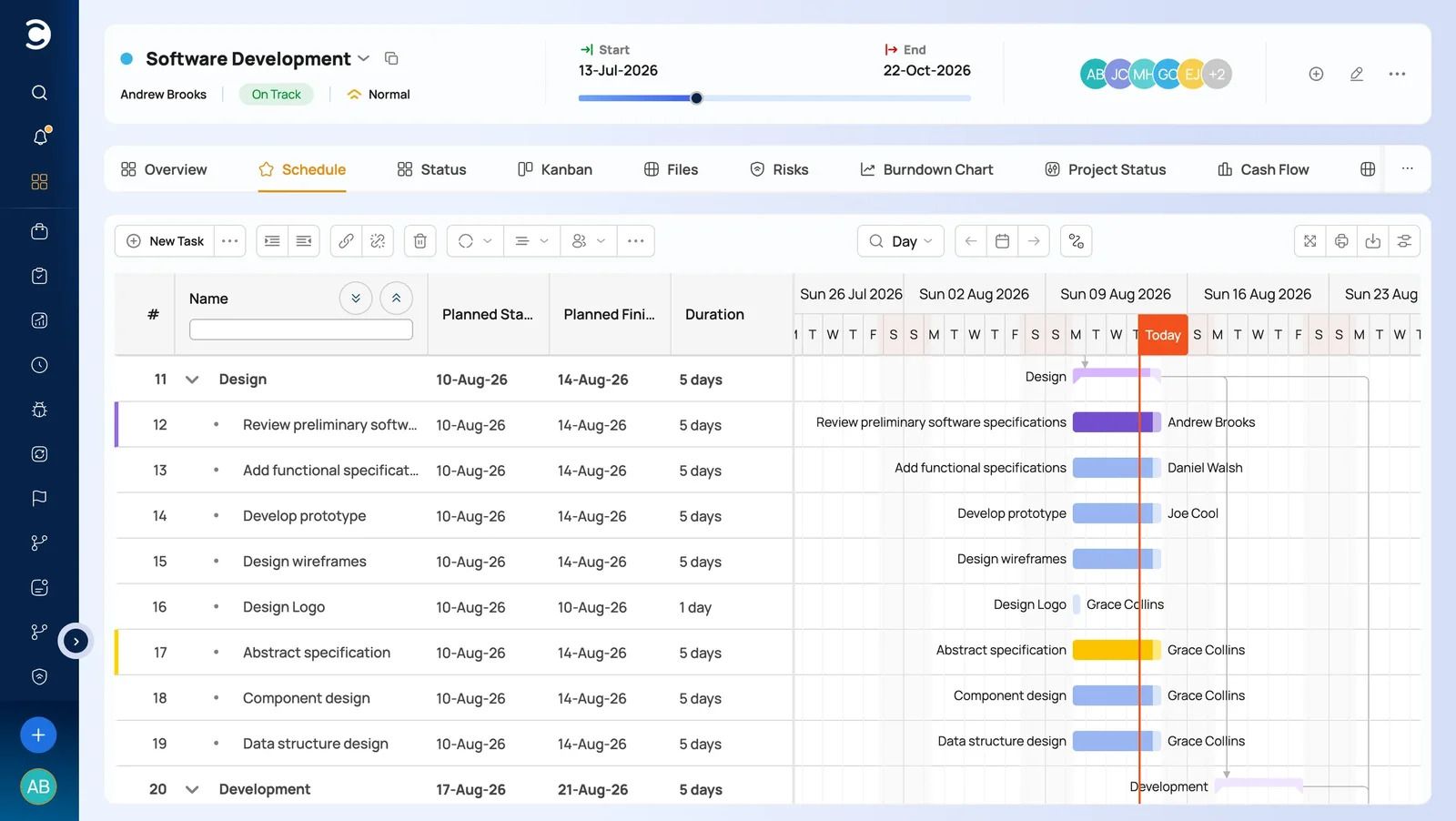
An interactive Gantt chart with auto-scheduling. When a dependency or date changes inside Celoxis, the schedule recalculates and the critical path updates with it, so a leveling change shows its real effect on the end date immediately rather than after a manual recalculation. The Gantt chart functions as a live planning surface across multiple, interdependent projects, not a static picture that gets redrawn every time something shifts.
Resource allocation by skill, availability, and priority. Assignments account for resource calendars, including holidays, part-time schedules, and time zones, so the resource loading chart reflects real available hours instead of a theoretical 40-hour week. This is covered in more depth in our guide to resource management software features.
A cross-project workload view. Since overallocation usually shows up across projects rather than inside a single plan, Celoxis gives PMOs a workload view spanning the full portfolio, which is exactly the layer a single-project Gantt chart cannot provide on its own. We go into why this matters specifically for PMOs in this piece on resource management for PMOs.
Role-based and placeholder staffing before named hiring. Earlier in planning, when you know you need two developers and one QA engineer but not who yet, that gap should be visible against real capacity the same way a named assignment would be. This lets leveling and staffing decisions happen before recruiting starts, not after a hire falls through. Our guide to resource planning software covers this pattern in more detail.
Planned versus actual comparison. Capacity planning tools that compare planned effort against logged effort help confirm whether a leveled schedule turned out to be realistic, an input worth tracking as one of your standing project management KPIs, and it feeds directly into both earned value management and the next round of planning instead of repeating the same estimation mistake.
Honest note: because Celoxis covers scheduling, resource management, and portfolio reporting in one platform, teams moving over from a simple Gantt-only tool usually spend the first week or two configuring calendars, roles, and permissions to match how they actually work. Guided onboarding is part of every trial, and most teams are fully operational within days rather than weeks.
To be clear about scope: the goal here is resource leveling and allocation done well, not a longer feature list. If your problem stays inside a single project’s schedule, the Gantt chart and resource views above are the relevant part of Celoxis. If it grows into managing dozens of projects with shared resources and portfolio-level reporting, that is where the broader project portfolio management capability becomes relevant, and our wider PPM tools guide is a good next stop, but it is worth evaluating on its own terms rather than assuming you need it from day one.

A decision checklist for evaluating resource allocation software
Whether you are a PMO standardizing tooling, a CTO trying to fix engineering capacity blindness, or a director signing off on a purchase, these are the questions worth asking any resource and capacity planning tools vendor directly, ideally with your own project data rather than a canned demo:
Does it show overallocation across every project a person is on, not just inside one plan?
Can you assign role-based placeholders before a specific person is named or hired?
When you resolve a conflict, does the critical path and end date recalculate automatically?
Can you model a what-if change, such as a new project or a delayed hire, without disturbing the live schedule?
Can you compare planned effort against actual logged effort to check whether past leveling decisions held up?
How long does it actually take a project manager to learn the resource view, tested with your own project during a trial rather than a scripted sales demo?
If you are still building your shortlist, our broader roundup of IT project management tools and our project management software comparison are useful starting points before narrowing in on resource leveling specifically.


Comments
0 responses